
Book a demo
Teamnet Time and Attendance

Every shift planned, every hour counted, every day ready for pay.

Rosters, punches, overtime, weekly offs, leave and corrections for office, field and three-shift crews - from Teamnet Turnstiles, the gates you run, the phone or the register. Managers confirm the gaps; payroll gets a month it can use.

Follow one week on the floor ↓

The problem

Rosters, punches and overtime live in different places, so the hours are argued over at the cut-off.

With Teamnet

Every shift planned, every punch matched to the roster and every gap confirmed by a supervisor before the pay run.

The problem

The hours are real. The record of them is not.

A roster on a whiteboard, punches in a controller, overtime on paper. By the cut-off, nobody can say who worked what.

Rosters on whiteboardsSwaps and covers agreed on the floor never reach the record.
Overtime nobody approvedHours are paid because they were worked, not because anyone agreed them.
Weekly offs missedA crew works seven days straight before anyone notices.
Corrections at month endForgotten punches pile up for the last week before payroll.
How it works

One week on the floor, to the pay run.

Monday

The roster, published to every phone

Who acts: SupervisorEmployee

Supervisors build the week from shift patterns - fixed, rotating, split or night - with weekly offs and rest between shifts set by your rules. Everyone sees their shift in the Teamnet App.

  • Who gains
  • SupervisorOne roster, not a whiteboard and three chats.
  • EmployeeTheir shift on their phone, in their language.
Every day

Punches from the gate, the phone or the register

Who acts: EmployeeSecurity

People punch at Teamnet Turnstiles, at the readers you run, in the app with location and photo for field staff, or on a supervisor's register for remote sites. Each punch lands on the day it belongs to, night shifts included.

  • Who gains
  • SecurityEntry and attendance from the same turn.
  • Field staffPunch from the site, on their own phone.
Wednesday

Overtime asked, approved and within limits

Who acts: SupervisorPlant head

Overtime is requested before or after the shift and approved by the rules you set: daily, weekly and quarterly limits, rates by day type, and comp-off or pay, by your policy.

  • Who gains
  • Plant headOvertime agreed, not discovered.
  • FinanceOvertime cost known before the run.
Any day

Leave and corrections from the phone

Who acts: EmployeeManager

Employees ask for leave, a shift swap or a correction for a forgotten punch in the app; managers approve; balances update by themselves. Every correction is confirmed by a person.

  • Who gains
  • EmployeeAsked and answered on the phone.
  • HRNo registers to reconcile at month end.
Cut-off

A month payroll can use

Who acts: Teamnet AIHR

At the cut-off, Teamnet AI lists what is still open - missing punches, unapproved overtime, a weekly off not taken - with the owner for each. HR closes the month and it goes to payroll.

  • Who gains
  • Payroll teamDays and hours in, on the cut-off date.
  • HRA short list of owners to chase, not a muster to check.
Everything in Time and Attendance

Every rule your floor runs on.

Shifts and rostersFixed, rotating, split and night shifts, by team and site.
Overtime rulesDaily, weekly and quarterly limits, rates by day type, approval before pay.
Weekly offs and restOne day in seven, rest between shifts, and the limits your country sets.
Comp-offTime off in place of overtime pay, where your policy allows, with expiry.
Leave policiesBy grade, site and country: accrual, carry forward, encashment and holidays.
RegularisationForgotten punches and on-duty days corrected with a manager's approval.
Mobile punchLocation and photo for field and remote staff, offline where signal drops.
Gates and readersTeamnet Turnstiles and the readers you run, on the same record.
Attendance reportsLate coming, absence, overtime and cost by team, site and shift.
Teamnet AI in attendance

Every missing punch and overtime limit flagged before the cut-off.

PredictA crew heading past its weekly or quarterly overtime limit flagged before it happens.
WatchA weekly off missed or a rest gap too short shown on the roster.
ReadPaper registers from remote sites read into the record.
WatchUnusual punch patterns flagged for a supervisor to look at.
ActNext week's roster prepared against skills, rest rules and leave, for the supervisor to confirm.
AskAsk who went past the overtime limit last week, and see each day behind the answer.

See Teamnet AI →

At the gate

Walk in once, and the day counts.

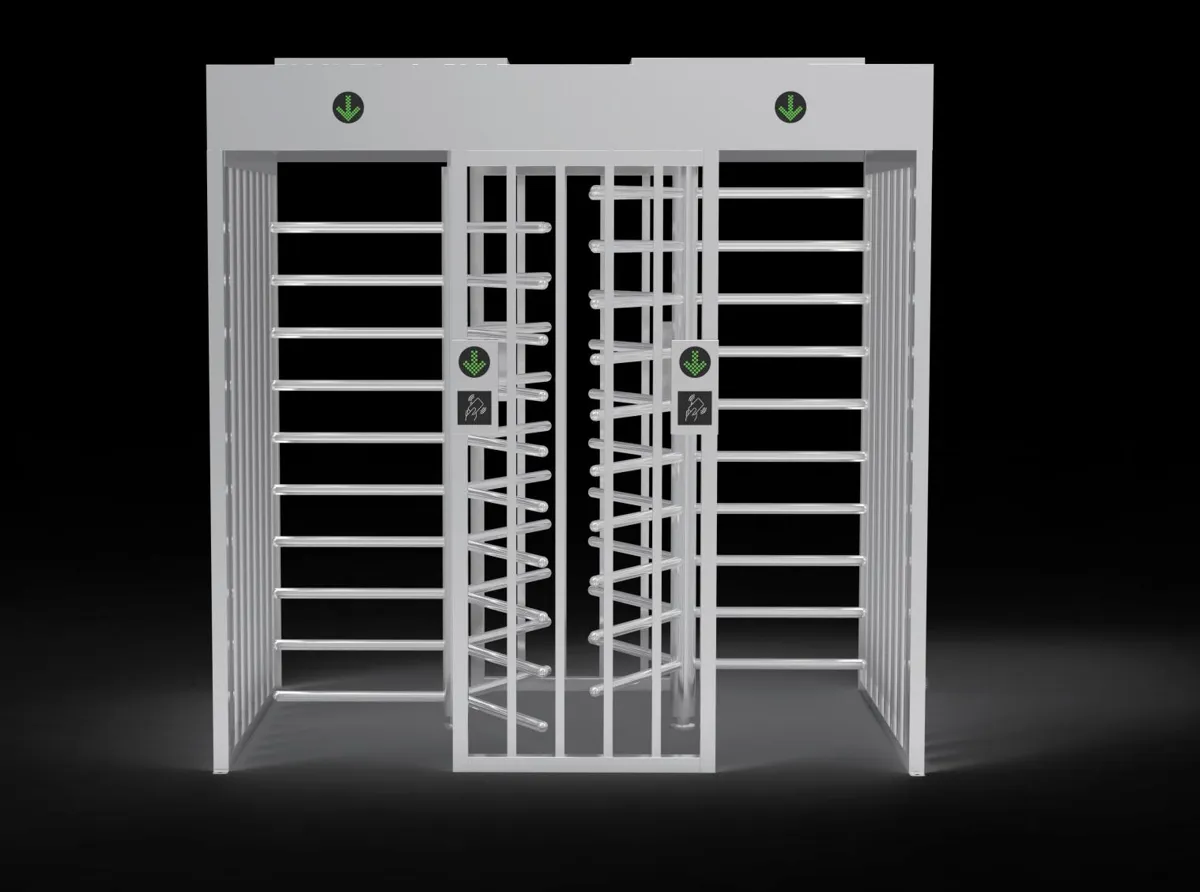
Teamnet makes single- and dual-lane full-height turnstiles. Each turn is one person, counted toward the right day.

  • Card, fingerprint or QR at the reader
  • Only people on a current contract let in
  • Works with the gates you already run, where the make can be connected

See Teamnet Access →

Teamnet Gate FH2 dual-lane full-height turnstileMade by Teamnet - Gate FH2
Questions

What plant and HR heads ask us.

Can we keep our biometric readers?

Yes, where the make can be connected. We confirm it during the site survey.

Does it handle night shifts that cross midnight?

Yes. A night shift's punches land on the day the shift belongs to.

Can field staff punch without a gate?

Yes. The Teamnet App records location and photo, and works offline where the signal drops.

Does it cover contract workers too?

Yes. Contract workers pass the same gates; each contractor's month is checked on Teamnet Contract Labour.

Every shift planned, every hour agreed, every day counted. Never Miss.

Bring one week's roster and punch file. We will show you the same week in Teamnet.

Teamnet Payroll → Teamnet Access → Teamnet App →

Book a demo